 CloudConverter
MP3, FLAC and WAV are the three audio formats people run into most often. They all play music, but they store it in very different ways, and the choice affects file size, sound quality and where the file will play.
This guide explains the differences in plain language and helps you pick the right format for each job.
The short answer
- MP3: small files that play everywhere. Some audio detail is permanently removed.
- FLAC: exactly the same sound as the original, in a file about half the size of a WAV.
- WAV: uncompressed audio. Huge files, but ideal for editing.
WAV: uncompressed audio
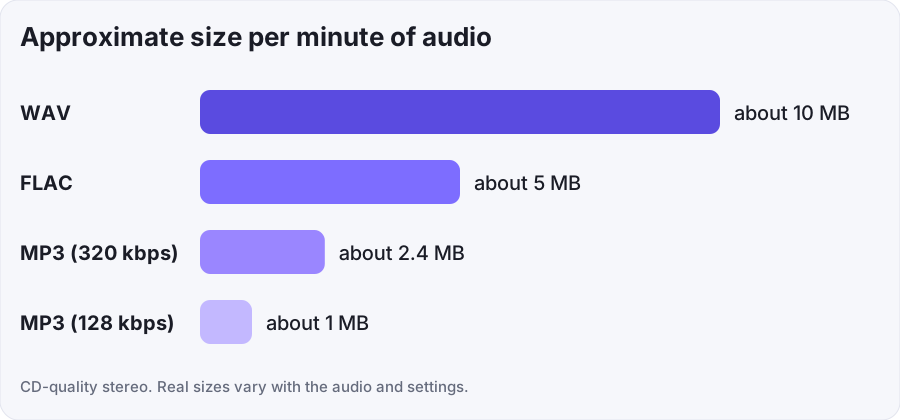
WAV stores audio exactly as it was recorded, with no compression. That makes it the standard format for recording and editing, because nothing has been thrown away. The downside is size. CD-quality audio takes up about 10 MB for every minute, so a 4-minute song is around 40 MB.
WAV also has weak support for tags such as artist, album and cover art, which makes it less convenient for a music library.
MP3: small and compatible
MP3 is a lossy format. It removes parts of the sound that are hardest to hear, which shrinks the file to a fraction of the original size. At 128 kbps a song takes roughly 1 MB per minute, and at 320 kbps roughly 2.4 MB per minute.
Nearly every phone, car stereo, speaker and app can play MP3, which is why it remains the default for sharing. The loss of detail is permanent: you cannot recover it by converting the MP3 back to another format.
FLAC: lossless and smaller than WAV
FLAC compresses audio without discarding anything. When you play a FLAC file, the decoded sound is identical to the original recording. The files are usually around half the size of a WAV, depending on the music, and FLAC supports proper tags and cover art, so it suits music collections and archives.
Its main limit is compatibility. Most modern phones and music apps play FLAC, but some older devices, car stereos and software do not.
Comparison table
| Feature | WAV | FLAC | MP3 |
|---|---|---|---|
| Compression | None | Lossless | Lossy |
| Size per minute (CD quality) | About 10 MB | About 5 MB | About 1 to 2.4 MB |
| Sound quality | Original | Original | Slightly reduced |
| Tags and cover art | Limited | Good | Good |
| Device support | Wide | Good, not universal | Everywhere |
| Best for | Recording and editing | Archiving music | Sharing and portable use |
Sizes are approximate and vary with the audio and settings.
Which one should you choose?
- Sharing a song or podcast: MP3. Everyone can play it and the file is small.
- Building a music library or archive: FLAC. You keep full quality and save space compared with WAV.
- Recording or editing audio: WAV, then export a FLAC or MP3 when you are finished.
- Limited phone storage: MP3 or another lossy format.
Common mistakes
Converting an MP3 to WAV or FLAC does not bring back the detail MP3 removed. You get a bigger file that sounds the same as the MP3. Always convert from the best version you have, and keep your original recording.
Converting between two lossy formats, such as AAC to MP3, adds a small amount of extra loss each time, so avoid repeating it.
How to convert between them
- WAV to MP3 to shrink recordings for sharing and phones.
- FLAC to MP3 to make lossless music portable.
- WAV to FLAC to save space without losing any quality.
- MP3 to WAV when an editor or device needs uncompressed audio.
Frequently asked questions
Is FLAC better than MP3?
FLAC keeps all the original audio, so it is better for quality and archiving. MP3 is better for small files and compatibility. On everyday speakers and earphones, many people cannot hear the difference at a good MP3 bitrate.
Is WAV better than FLAC?
They sound identical, since both are lossless. WAV is simpler and preferred for editing. FLAC takes about half the space and handles tags better, so it is the better choice for storage.
Can I turn an MP3 into FLAC to improve the quality?
No. Once detail has been removed by MP3 compression, it cannot be restored. The FLAC would simply be a larger copy of the same MP3 sound.
Which format is best for a podcast?
MP3 is the standard. It is small, plays on every app and device, and the speech stays clear. Record and edit in WAV, then export an MP3 for publishing.
Need a different format? The WAV to MP3 converter and the FLAC to MP3 converter are free, with no sign-up and no watermark.